Meal-planning app for iPhone and Android

Plan your week of meals. Get the grocery list. Order it on Instacart.

FoodyFoo is a meal-planning app that turns the recipes you pick for the week into a grocery list, grouped by store section and ready to send to Instacart. Save your allergies and diet, share the plan with your household, and ask the AI assistant for ideas when you're stuck.

  • Download FoodyFoo on the App Store
  • Get FoodyFoo on Google Play

Free to download. Optional FoodyFoo Pro subscription. See pricing.

Switching from Mealime? Mealime announced it would be discontinued on October 21, 2026. See how FoodyFoo compares.

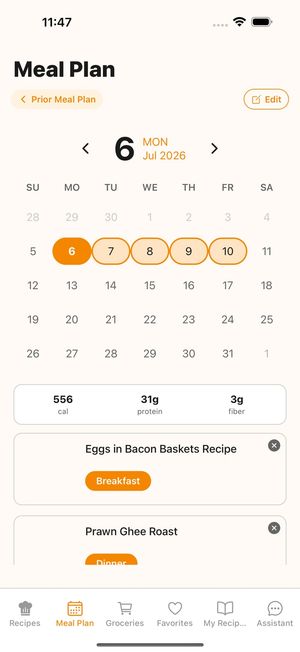
FoodyFoo Meal Plan screen: a calendar with Monday to Friday selected, daily calorie, protein and fiber totals (a Pro feature), and recipes scheduled for breakfast and dinner
Daily totals are a Pro feature.

How it works

From "what's for dinner?" to groceries in your cart

Find recipes you'll actually cook

Browse popular and recommended recipes or search by keyword. Recipes come from the Edamam recipe database. When you're signed in, recipe search leaves out recipes labeled as containing the allergies you've saved. Keto, Paleo, Vegetarian, and Vegan diets narrow your recommended recipes, and dislikes help filter them.

You can browse recipes before you create an account.
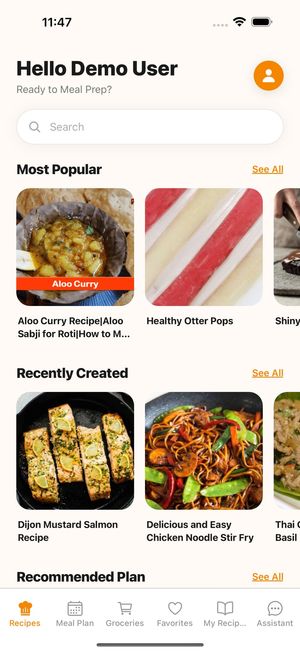
FoodyFoo Recipes tab with a search box and rows of Most Popular and Recently Created recipes

Plan the week in a few taps

Choose your days (Mon–Fri, Mon–Sun, or the same days as your last plan), then add recipes to breakfast, lunch, dinner or snacks. Put more than one recipe in a meal, or schedule leftovers as a meal of their own.

With Pro you can schedule next week's plan alongside this one and see daily calorie, protein and fiber totals on your plan.

FoodyFoo Meal Plan screen: a calendar with Monday to Friday selected, daily calorie, protein and fiber totals (a Pro feature), and recipes scheduled for breakfast and dinner
Daily totals are a Pro feature.

What you need on the recipe page

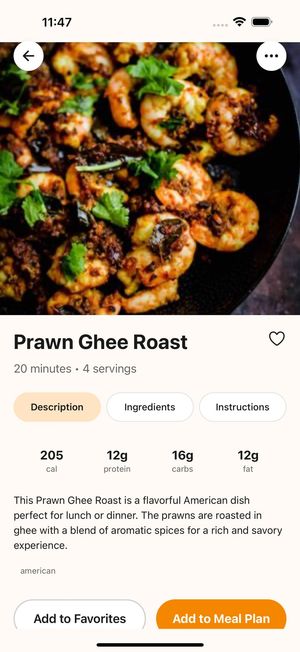
Each recipe shows calories, protein, carbs and fat per serving and its ingredients, with a link to the full method on the original recipe site. If you're signed in, it may flag a recipe that could contain an allergen you've saved. Add it to your meal plan or favorites, keep your own notes, or share it.

FoodyFoo recipe page for Prawn Ghee Roast showing calories, protein, carbs and fat per serving, with Add to Favorites and Add to Meal Plan buttons

A grocery list that builds itself, then Instacart

  • Your list is built from the recipes on your plan and grouped by store section.
  • Add your own items, and keep a pantry so things you already have move out of the way.
  • Ingredients that may contain one of your saved allergens may be flagged.
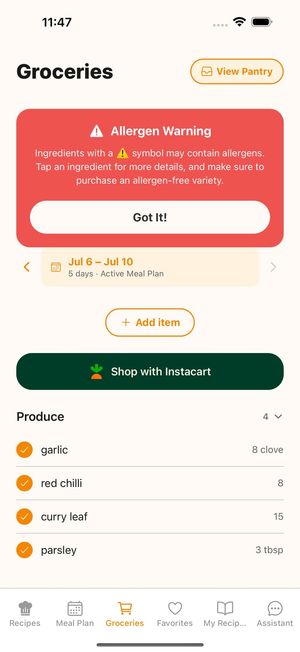
  • Untick anything you don't need before sending, then tap Shop with Instacart. FoodyFoo sends the ticked items to Instacart, where you choose products and check out.
FoodyFoo Groceries screen: an allergen warning banner, the active meal plan dates, an Add item button, a Shop with Instacart button and produce items grouped by store section

An AI assistant for when you're stuck

Ask the FoodyFoo assistant for recipe ideas. It can search recipes, suggest meals based on the preferences you've saved, and add them to your meal plan when you ask it to. Free accounts get 10 assistant messages a day; Pro includes more (with a fair-use limit).

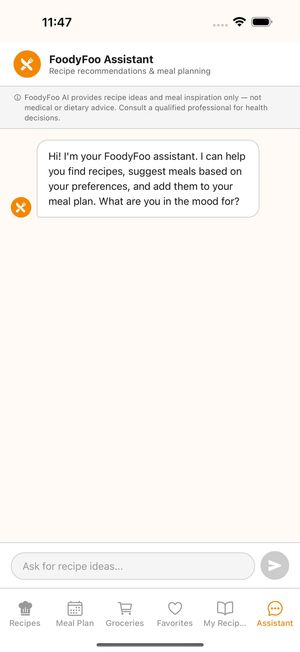
The assistant offers recipe ideas and meal inspiration only. It isn't medical or dietary advice.

FoodyFoo Assistant chat screen with a note that it provides recipe ideas and meal inspiration only, not medical or dietary advice

Explore by what you need

Made for real kitchens

  • Share with your household

    A FoodyFoo Pro subscriber can create a household and invite people by link or code. Everyone in the household sees the same meal plan and grocery list. Joining a household is free. Recipes you add to My Recipes are visible to everyone in your household, with your name shown; only you can edit them.

  • Allergy-aware

    When you're signed in, recipe search leaves out recipes labeled as containing the allergies you've saved. It can filter Dairy, Egg, Fish, Shellfish, Tree Nut, Peanut, Gluten, Soy, Sesame, Mustard, and Sulfite. Allergen info comes from recipe data and may be incomplete. Ingredient lists and descriptions in the app may be reformatted by AI, and allergen flags may miss things. Always check the original recipe and product labels.

  • Your own recipes too

    Add family favorites to My Recipes: snap a photo of a recipe, import one from a link, or type it in. Scan a product barcode to add a packaged food, with its nutrition, as a recipe. Up to 3 of your own recipes on the free plan (up to 3 can come from link or photo imports); Pro removes the limit.

  • Favorites

    Save recipes you love. With Pro, organize them into your own categories.

  • Helpful reminders

    Optional reminders to plan your week and prep ahead, plus reminders for breakfast, lunch and dinner on your plan.

Get FoodyFoo, meals made easy!

Free to download on iPhone and Android. Optional Pro subscription.

  • Download FoodyFoo on the App Store
  • Get FoodyFoo on Google Play